


01
Bluesky Video Downloader Online
Download supported public Bluesky videos directly through your web browser without installing a separate downloader app, desktop program, or browser extension.
Download Bluesky videos online for free with our Bluesky Video Downloader. Paste a public Bluesky video URL to preview the video and save the available MP4 file directly to your device. No app, software, or registration required.
More Tools
Explore our other free online video downloaders for supported platforms.
How it works
Open Bluesky and find the public post containing the video you want to download. Open the post options or share menu and copy the Bluesky post URL.
Paste the copied public Bluesky post URL into the Bluesky Video Downloader above.
Click Download to process the supported Bluesky video. Preview the available video and click Download MP4 to save it to your device.
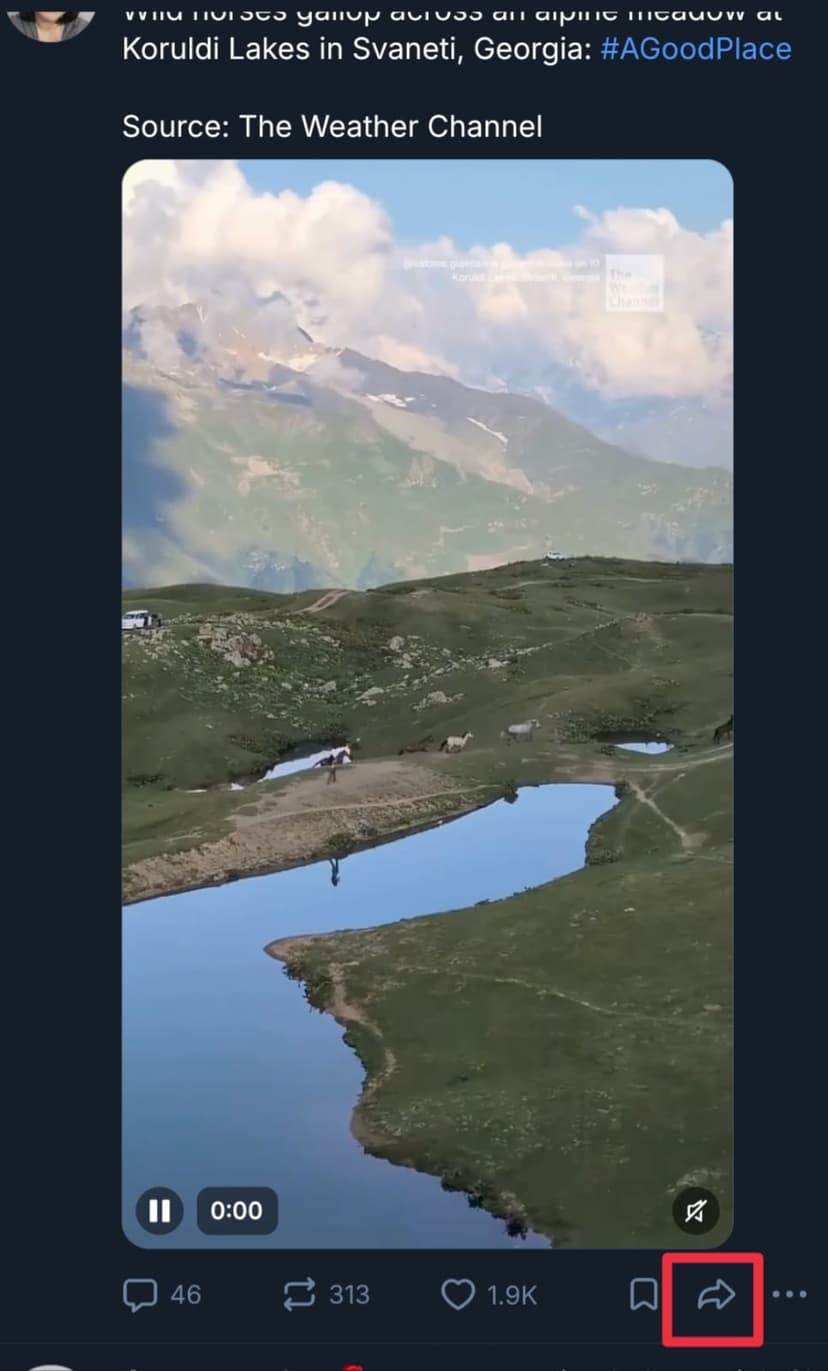
Open a Bluesky video
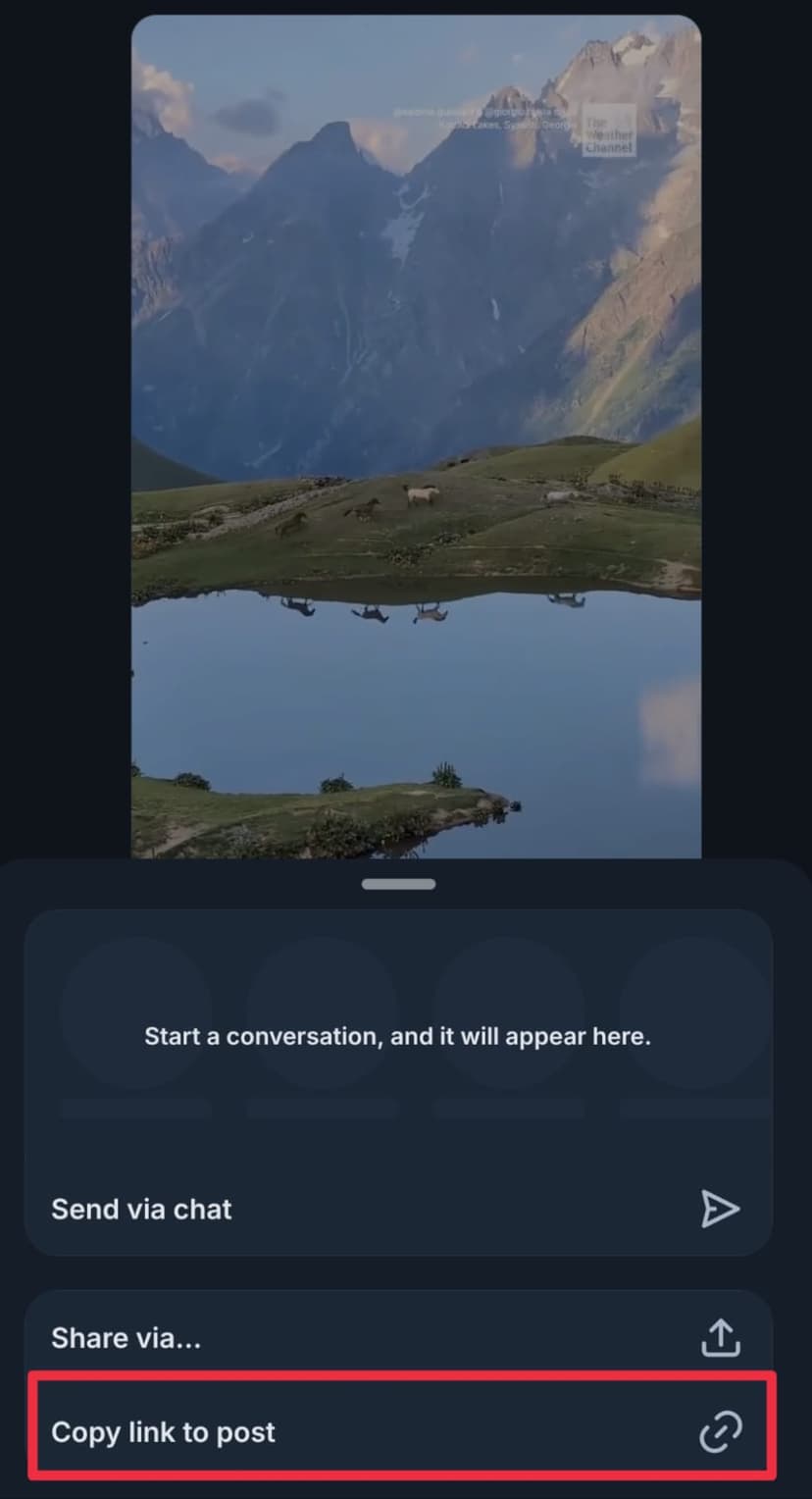
Copy the video link
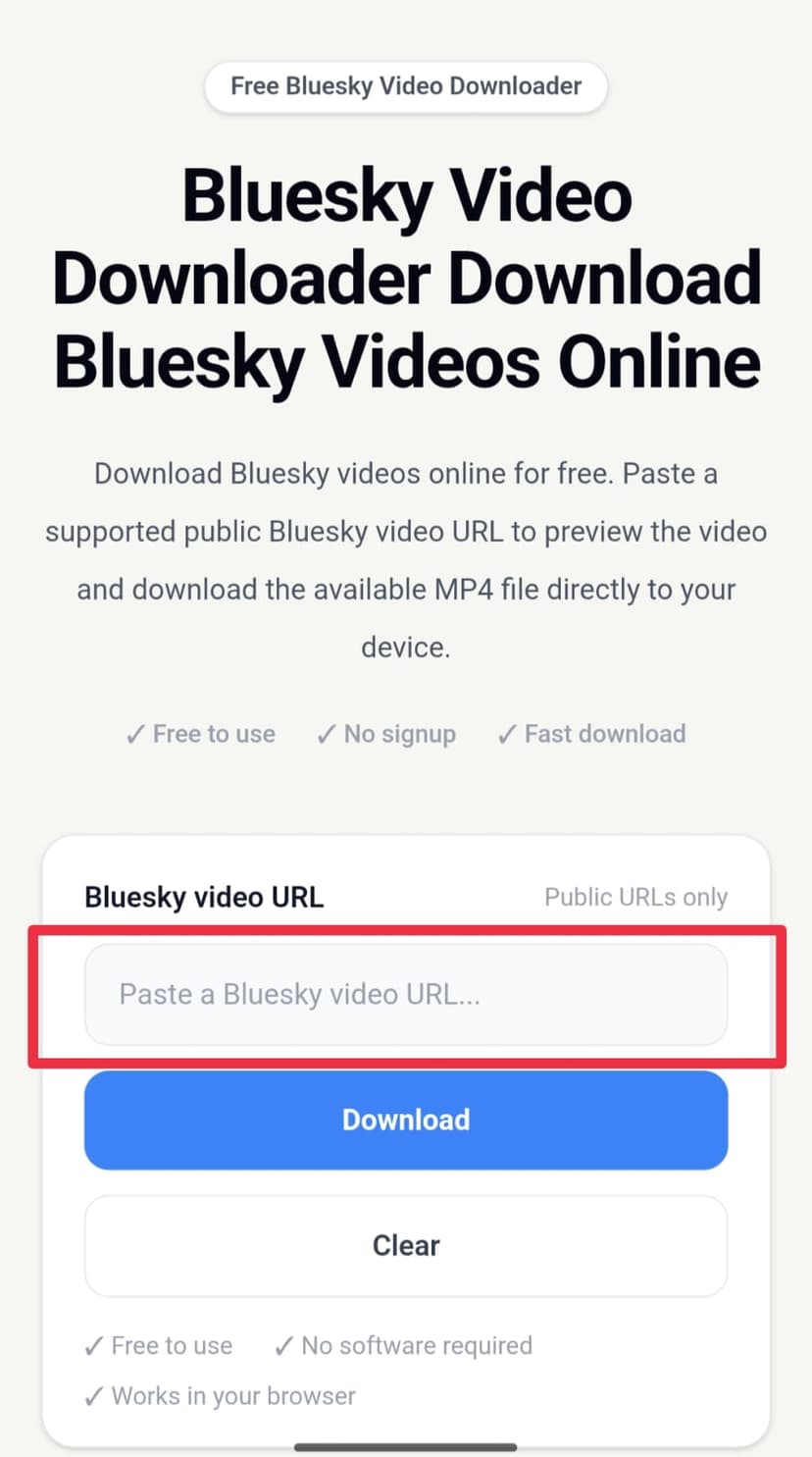
Paste the link and download
About Our Bluesky Video Downloader
Our Bluesky Video Downloader is a free online tool for downloading supported public Bluesky videos directly from your web browser. If you find a video on Bluesky that you want to save for offline viewing or personal use, simply copy the public post URL and paste it into the downloader. When the video source is supported, you can preview it and download the available MP4 file without installing additional software.
Downloading a Bluesky video is simple. Open Bluesky, find the public post containing the video, copy the post link, and paste the URL into our Bluesky video downloader. The tool processes the supported video source and provides the available video for preview and download. This link-based workflow makes it easy to download Bluesky videos without using a separate desktop program or mobile downloader app.
The Bluesky downloader is designed to work through modern web browsers on common devices. You can use it on Windows PC, Mac, iPhone, Android phones, tablets, and other supported devices. The downloader itself does not require you to create an account or install a browser extension. Video availability, resolution, and quality depend on the original public media source.
You can use this Bluesky video downloader when you need to save a publicly available video for offline viewing, personal reference, editing, or other permitted purposes. The tool is intended for publicly accessible and technically supported Bluesky video sources. It does not provide access to private, restricted, deleted, or otherwise unavailable content.
Our goal is to make Bluesky video downloading straightforward: find a public Bluesky video, copy its link, paste the URL, preview the available video, and download the MP4 file. Because the process works online in a browser, you can download supported Bluesky videos without installing additional downloader software.
Bluesky Video Download Guide
You can download a public Bluesky video in a few simple steps. All you need is the URL of the public Bluesky post containing the video and a modern web browser.
Find a public Bluesky video: Open Bluesky and find a public post containing the video you want to save.
Copy the Bluesky post link: Open the post sharing options or copy the URL from your browser and get the link to the public Bluesky post.
Paste the video URL: Return to this Bluesky Video Downloader and paste the copied post URL into the video URL field.
Start the download: Click the Download button to process the supported public Bluesky video source.
Preview the video: If the video is supported and available, use the preview to confirm that the correct Bluesky video has been detected.
Download the MP4 file: Click Download MP4 to save the available Bluesky video to your device.
Download on Any Device
Because the Bluesky downloader works through a modern web browser, you can use it on phones, tablets, laptops, and desktop computers without installing a dedicated downloader application.
Open Bluesky on your iPhone and copy the URL of a public video post. Open this Bluesky Video Downloader in Safari or another supported browser, paste the post URL, process the video, preview it, and download the available MP4 file.
On Android, copy the URL of a public Bluesky video post and open this downloader in Chrome or another modern browser. Paste the URL, process the supported video, and download the available MP4 file.
On a Windows PC or other desktop computer, copy the public Bluesky post URL and paste it into the downloader. After the video is processed, preview it and use Download MP4 to save the file to your computer.
Mac users can open Bluesky in a browser, copy the URL of a public video post, and paste it into the Bluesky Video Downloader. When supported, the video can be previewed and saved as an MP4 file.
Bluesky to MP4
MP4 is a widely supported video format that works with many smartphones, computers, tablets, browsers, and media players. When a supported Bluesky video source is available, this Bluesky downloader provides the available video as an MP4 file for saving to your device.
To download a Bluesky video as MP4, copy the URL of the public Bluesky post containing the video and paste it into the downloader. Click Download, wait for the video to be processed, preview the available video, and select Download MP4 to save the file.
The downloaded video's resolution and quality depend on the original media source available from Bluesky. The downloader does not artificially increase the resolution or create a higher-quality version than the available source.
Features
Download supported public Bluesky videos directly through your web browser without installing a separate downloader app, desktop program, or browser extension.
Copy a public Bluesky post URL, paste it into the downloader, process the available video, preview it, and download the supported MP4 file.
Use the Bluesky downloader on iPhone, Android, tablets, Windows PC, Mac, and other devices with a modern web browser.
Preview the available Bluesky video before downloading it so you can confirm the correct video before saving the MP4 file.
Use the online Bluesky Video Downloader for free to process supported public Bluesky video URLs without requiring a paid subscription.
Download supported Bluesky videos online through your browser without installing separate downloader software, mobile applications, or browser extensions.
Video Quality
The quality of a downloaded Bluesky video depends on the original video uploaded to Bluesky and the media source available for the public post. The downloader provides the supported source that is available and does not create a higher-quality version than the original media.
If a high-quality video source is available for a supported public Bluesky post, the downloader can provide that available source for download. If only a lower-resolution source is available, the downloaded video will reflect the quality and resolution of that source.
The built-in video preview allows you to check the available media before downloading. This can help you confirm that the correct Bluesky video and available quality are being processed.
Supported Content
This Bluesky Video Downloader is designed to process supported publicly accessible Bluesky posts containing video media. To use the downloader, you need a valid public Bluesky post URL that contains a video source supported by the service.
Private, restricted, deleted, unavailable, or unsupported Bluesky posts may not be downloadable. If a video cannot be processed, check that the post is publicly accessible and that you copied the correct Bluesky post URL.
Video availability can also depend on the current media source and technical changes to Bluesky. As a result, one public Bluesky video may work while another specific post may not be supported.
Responsible Use
Only download Bluesky videos when you have the right or permission to save and use the content. A video being publicly accessible does not automatically mean that it can be redistributed, republished, or used commercially.
Respect the original creator's copyright, privacy, and other rights when downloading Bluesky videos. If you plan to repost, edit, publish, distribute, or commercially use a downloaded video, make sure you have the necessary permission or rights.
Troubleshooting
If a Bluesky video is not downloading, first check that you copied the URL of the correct public post. Make sure the post is still available, publicly accessible, and contains a supported video.
You can also refresh the downloader page, paste the Bluesky URL again, or try another modern web browser. Temporary problems with the original Bluesky media source can also prevent a video from being processed.
If the downloader works for other Bluesky videos but does not work with one specific post, the issue may be related to that post, its visibility, its media source, or its compatibility rather than the downloader itself.
FAQ
A Bluesky Video Downloader is an online tool that processes supported public Bluesky post URLs and allows you to save the available video directly to your device.
Open the public Bluesky post containing the video, copy its URL, paste the URL into this Bluesky Video Downloader, and click Download. If the post and video are supported, you can preview the video and save the available MP4 file.
Yes. This online Bluesky Video Downloader is free to use for supported public Bluesky video URLs. You do not need to purchase a separate downloader application.
Yes. You can download supported public Bluesky videos online by opening this downloader in a modern browser, pasting the public Bluesky post URL, and downloading the available video.
Yes. When a supported public Bluesky video source is available, the downloader provides the available video as an MP4 file that you can save to your device.
Yes. Open this Bluesky Video Downloader in Safari or another supported iPhone browser, paste the URL of a public Bluesky video post, process the video, and download the available MP4 file.
Yes. You can use the Bluesky downloader on Android through a modern browser. Copy the public Bluesky post URL, paste it into the downloader, and download the available video.
Yes. The Bluesky Video Downloader works on supported desktop browsers. Copy a public Bluesky post URL, paste it into the downloader, and save the available MP4 file to your computer.
Yes. Mac users can open a modern browser, paste a public Bluesky video post URL into the downloader, and save the available video as an MP4 file.
No. The downloader works online through a modern web browser, so you do not need to install separate Bluesky downloader software, a desktop program, or a browser extension.
You do not need to create an account with this downloader. The tool is designed to process supported public Bluesky video post URLs.
Yes. The downloader is designed to process supported publicly accessible Bluesky posts containing video media.
No. The downloader does not provide access to private or restricted Bluesky content. The post and video must be publicly accessible and supported by the downloader.
The available video quality depends on the original media source provided by Bluesky. The downloader provides the supported source available for the public post and does not artificially increase its resolution.
The downloader does not add a watermark to the downloaded file. If the original Bluesky video contains a watermark or other visual element, that depends on the source video itself.
The URL may be incorrect, the Bluesky post may no longer be publicly accessible, the video may be unsupported, or the original media source may temporarily be unavailable. Check the URL and try again with another public Bluesky video post.
Paste the URL of the public Bluesky post containing the video. The downloader uses the post URL to locate and process the supported video.
The downloaded MP4 file is saved according to your browser's normal download settings. Depending on your device and browser, it may appear in your Downloads folder or another location selected in your browser settings.
This downloader is designed to process supported public Bluesky video URLs through your browser. You should still use downloaded content responsibly and avoid downloading or using content when you do not have the necessary rights or permission.
Yes. The downloader is designed to work with modern mobile and desktop browsers, including supported browsers on iPhone, Android, tablets, Windows, and Mac.